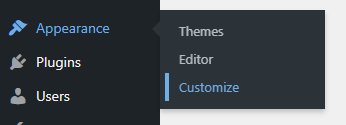
WordPress hides the Customize link when a block theme is active. Under Appearance you see Themes and Editor, and that is all. The Customizer still works: open /wp-admin/customize.php and it loads. One function in functions.php puts the link back in the menu. I checked this in WordPress 7.1.4.
Why the link is missing
WordPress adds Appearance → Customize in two cases: the active theme is a classic theme, or the theme or a plugin registers its own Customizer settings through the customize_register hook. A block theme without such a plugin gets no link.
Add the link
Paste this code into functions.php of your theme. If the theme gets updates, put the code in a child theme: an update overwrites functions.php.
function add_customize_menu_link() {
    add_submenu_page(
        'themes.php', // Parent menu slug (Appearance)
        'Customize', // Page title
        'Customize', // Menu title
        'manage_options', // Capability required to access
        '/customize.php' // URL to link to
    );
}

add_action('admin_menu', 'add_customize_menu_link');
Only administrators see the new item.
The favicon no longer needs the Customizer
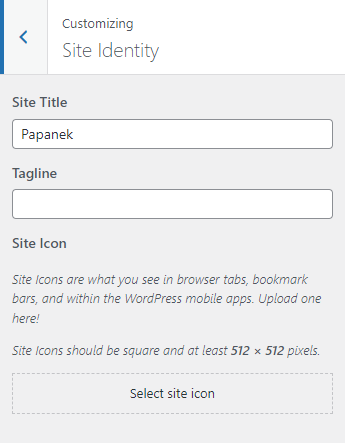
In April 2024, when I wrote the first version of this post, I set the site icon (favicon) in the Customizer. Since WordPress 6.5 the same setting is in Settings → General → Site Icon.
The old place: Customizer → Site Identity → Site Icon.
If the logo and the icon are the same image, select the Site Logo block in the Site Editor and turn on Use as Site Icon in the block settings sidebar.
When the link is still useful
Use the code if you or your client still open the Customizer, for example to edit Additional CSS there. Customizer CSS is saved per theme: after you switch themes, the CSS of the old theme no longer loads. The Site Editor has its own field: Styles → Additional CSS.
If a plugin registers Customizer settings, WordPress shows the link by itself. Skip the code then, or the menu gets two Customize items.
I set up and change block themes for clients. See Hire me.