Short answer: no. Astra is a classic theme. So are Kadence, GeneratePress, Blocksy, Neve and OceanWP. None of them has block templates, so in none of them can you edit the header, the footer or a template in the Site Editor.
The confusion is understandable. These themes say they are “built for Gutenberg”, three of them ship a theme.json file, and in WordPress 7.1 their Appearance menu has a Design item that opens a part of the Site Editor. Reviews call them block themes, and their own pages say “works with the block editor”. Both can be true at once: a theme can work well with blocks in posts and pages and still be classic.
I didn’t rely on reviews. I opened the files of the current version of each theme on wordpress.org, installed all six in WordPress 7.1.4 and asked WordPress itself. Here is what I found, and how to check any theme in a minute.
The six themes at a glance
| Theme | Version | Block theme? | theme.json | Appearance menu |
|---|---|---|---|---|
| Astra | 4.14.2 | No | Yes | Design, Customize |
| Kadence | 1.5.2 | No | Yes | Design, Customize |
| GeneratePress | 3.6.1 | No | No | Design, Customize |
| Blocksy | 2.1.61 | No | Yes | Design, Customize |
| Neve | 4.2.17 | No | No | Patterns, Customize |
| OceanWP | 4.2.8 | No | No | Design, Customize |
In all six, the header and the footer are set in the Customizer, and Astra, Kadence, Blocksy and Neve have a header and footer builder there. None of them has the Block themes tag on wordpress.org, and none has a templates folder with HTML templates. Their templates are PHP files: header.php, single.php, footer.php, as in WordPress themes before 2022.
What makes a theme a block theme
WordPress has one rule, and it’s simple. A theme is a block theme if it has a file templates/index.html (a child theme also counts if its parent has one). That file is a template made of blocks. With it, the theme gets the full Site Editor: templates, template parts like the header and footer, navigation, global styles and style variations.
theme.json is not the rule. It’s a settings file for the block editor: the color palette, font sizes, content width, spacing. A classic theme can have it too, and then blocks in your posts get the theme’s colors and widths. That’s what “block-ready”, “Gutenberg-ready” or “FSE-compatible” usually means on a theme’s sales page.
So there are three kinds of themes you will meet:
- Classic: PHP templates, settings in the Customizer. OceanWP, Neve and GeneratePress, which have no theme.json.
- Classic with theme.json, sometimes called hybrid: still PHP templates and the Customizer, but the block editor knows the theme’s palette and widths. Astra, Kadence and Blocksy.
- Block theme: HTML templates made of blocks, everything in the Site Editor, no Customizer unless a plugin adds it. Twenty Twenty-Five, the themes in this list of free personal website themes and my own themes.
What “Design” in the Appearance menu means
This is the part that misleads people. Activate Astra, open Appearance, and you see Design right under Themes. It opens the Site Editor screen. It looks like a block theme, but it isn’t.
WordPress builds this menu by a fixed rule. I checked it in the core code of 7.1.4:
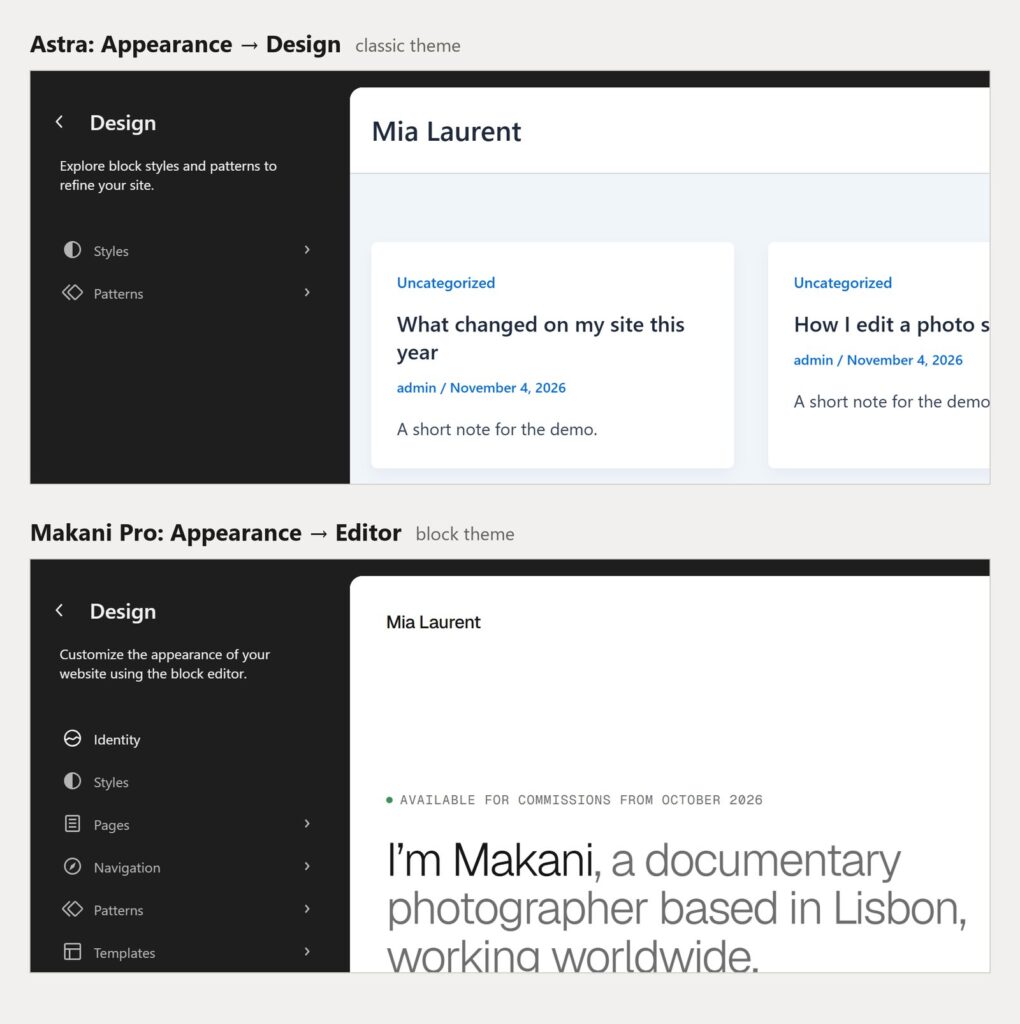
- Editor: the theme is a block theme. You get the full Site Editor.
- Design: a classic theme that has theme.json or declares editor styles. You get Styles and Patterns, nothing else.
- Patterns: any other classic theme. You can only manage patterns.
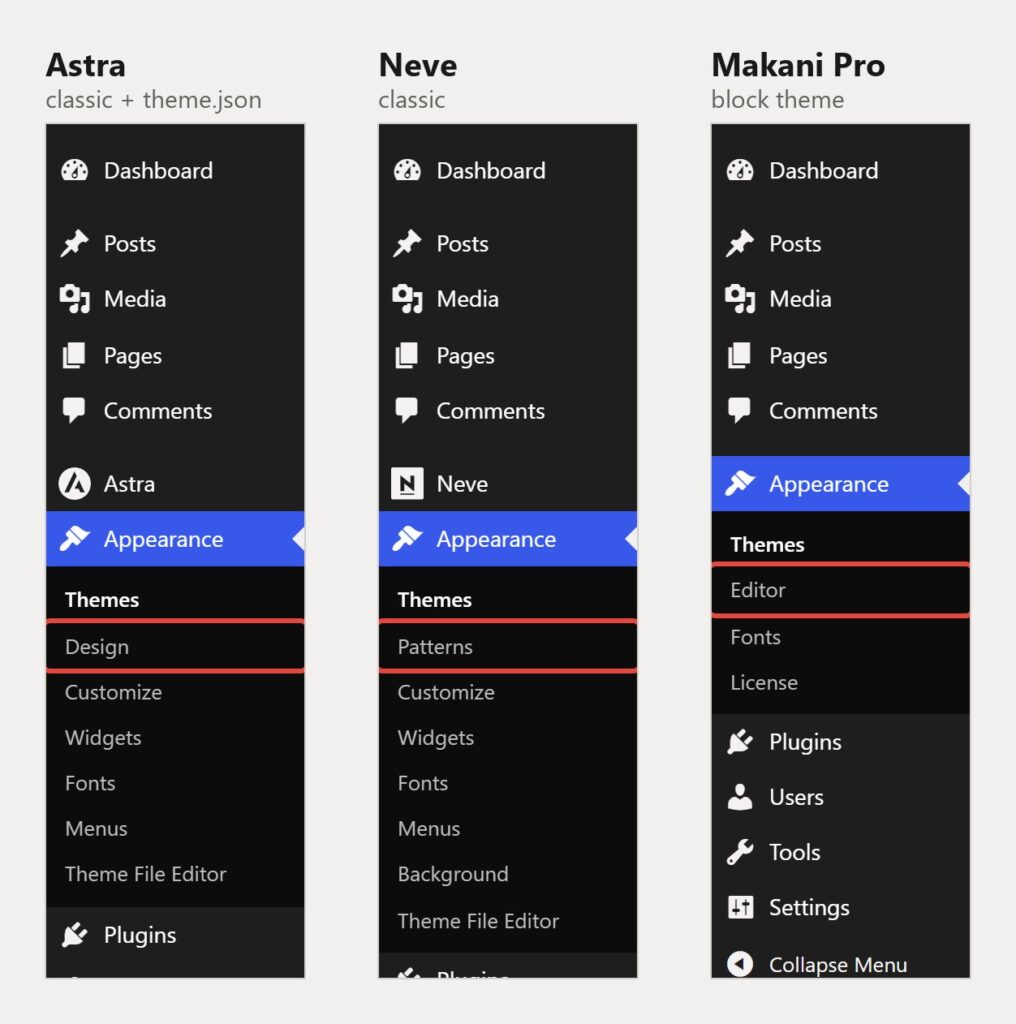
Five of the six themes get Design, Neve gets Patterns. What’s behind Design is easy to see when you compare the two screens:
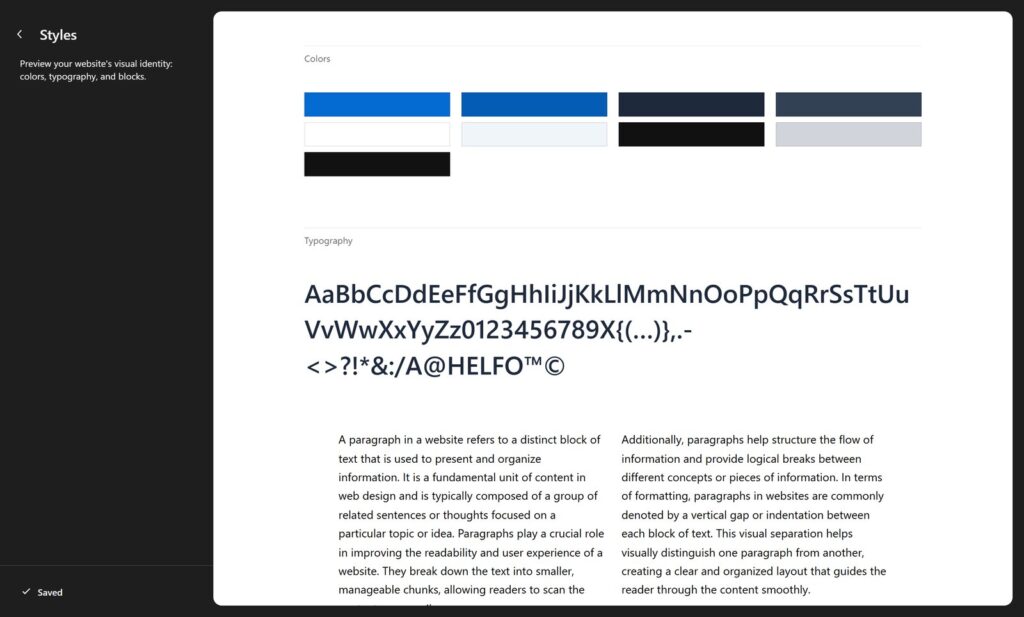
And Styles under Design is not the Styles panel of a block theme. It’s the Style Book: a preview of the theme’s colors, fonts and blocks. You can look, but there is nothing to change, no style variations and no palette editor. The colors you see come from the theme’s theme.json and its own settings.
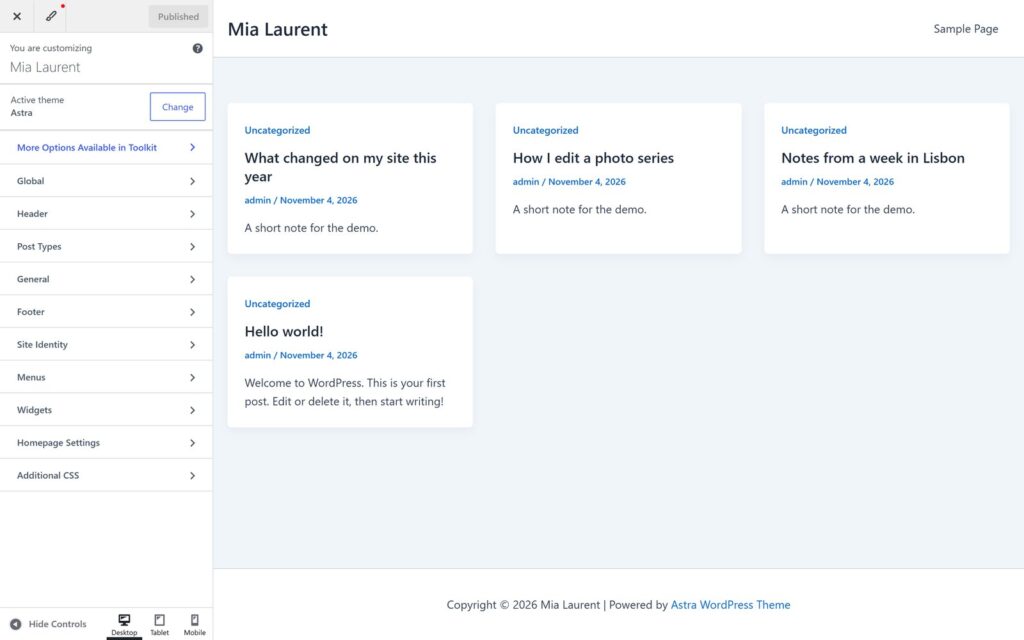
With these themes, the design lives in the Customizer and in the theme’s own settings page. In Astra it’s Appearance → Customize, with panels for Global, Header, Footer and Post Types. Kadence, Blocksy and Neve have their own header and footer builders in the Customizer too.
Each theme in one paragraph
Astra
Astra 4.14.2 by Brainstorm Force, 1+ million active installs. Classic theme with a theme.json (palette, font sizes, layout widths). Header, footer and layouts are in the Customizer. The same company made a separate block theme, Spectra One (version 1.2.6, about 7,000 installs). It’s a new theme, not a mode of Astra: your Astra settings don’t move to it.
Kadence
Kadence 1.5.2 by StellarWP, 500,000+ installs. Classic theme with a theme.json. Its header and footer builder is in the Customizer. The Kadence Blocks plugin adds blocks and can build headers, but it works with any theme. It doesn’t make Kadence a block theme. There is no Kadence block theme on wordpress.org.
GeneratePress
GeneratePress 3.6.1 by Tom Usborne (Edge22), 500,000+ installs. Classic theme without theme.json. The team says so themselves: GeneratePress uses PHP templates and isn’t a block theme. Block-based layouts come from the GenerateBlocks plugin and the paid GP Premium.
Blocksy
Blocksy 2.1.61 by Creative Themes, 300,000+ installs. Classic theme with a theme.json, the only one of the six on theme.json version 3. Header and footer builder in the Customizer. No block theme from the same author.
Neve
Neve 4.2.17 by Themeisle, 200,000+ installs. Classic theme without theme.json and without editor styles, so its menu shows Patterns, not Design. Themeisle publishes block themes separately: Neve FSE (1.1.7, about 8,000 installs) and Raft (1.1.17, about 10,000).
OceanWP
OceanWP 4.2.8, 400,000+ installs. Classic theme without theme.json, settings in the Customizer. No block theme from the same author on wordpress.org.
How to check any theme yourself
- In your dashboard: open Appearance. Editor means a block theme. Design or Patterns next to Customize means a classic theme.
- On wordpress.org: open the theme’s page and look at the tags. Block themes have the Block themes tag. You can also browse only block themes at wordpress.org/themes/tags/full-site-editing.
- In the files: look for
templates/index.htmlin the theme folder. Atheme.jsonalone proves nothing. - With WP-CLI: run this in the site folder, it prints
bool(true)for a block theme:
wp eval 'var_dump( wp_is_block_theme() );'For a theme on a sales site, before you buy: look for the words “block theme” or “Full Site Editing” and a screenshot of the Site Editor with templates. “Gutenberg-ready” and “works with the block editor” describe the editor for posts, not the theme.
Does it matter?
If your site runs on Astra or Kadence and you’re happy with it, there is no need to switch. Classic themes are not going away, and WordPress 7.1 supports the Customizer and widgets as before. Astra alone has over a million active sites.
The difference shows when you want to change the layout yourself:
- In a classic theme you change what the theme’s options allow. A header layout the builder doesn’t offer means PHP, a hook or a page builder.
- In a block theme the header, the footer and every template are blocks. You move, add and remove them in the Site Editor, the same way you edit a page. Style variations change the whole look in one click, see how to change colors in a block theme.
A block theme is a good choice for a new site, especially a personal site, a portfolio or a small business site where you want to change things without a page builder. A classic theme still makes sense if you depend on its builder, its WooCommerce options or a page builder like Elementor.
Before you switch from a classic theme
- Customizer settings belong to the theme. Logo, colors and header layout won’t carry over.
- Block themes have no widget areas. Widgets in the sidebar and footer don’t appear, you rebuild those parts with blocks.
- Classic menus stay in the database. The Navigation block offers to import them.
- Posts, pages and media don’t change. Try the new theme with Live Preview on the Themes screen before you activate it.
If you test a block theme and want to start over, here is how to reset a block theme’s templates and styles.
Block themes to look at instead
If you want a real block theme, start with Twenty Twenty-Five, which comes with WordPress, or the free block themes in my list for personal websites. My own themes are block themes too, with style variations and patterns for portfolios, photographers and personal sites, for example Makani Pro for a photographer. All of them are in the theme catalog.
Moving a site from a classic theme to a block theme, or need a custom one? I can help.